Google is allowing users to change their Gmail address, specifically the part before @gmail.com. This new feature is currently being rolled out exclusively in the United States.
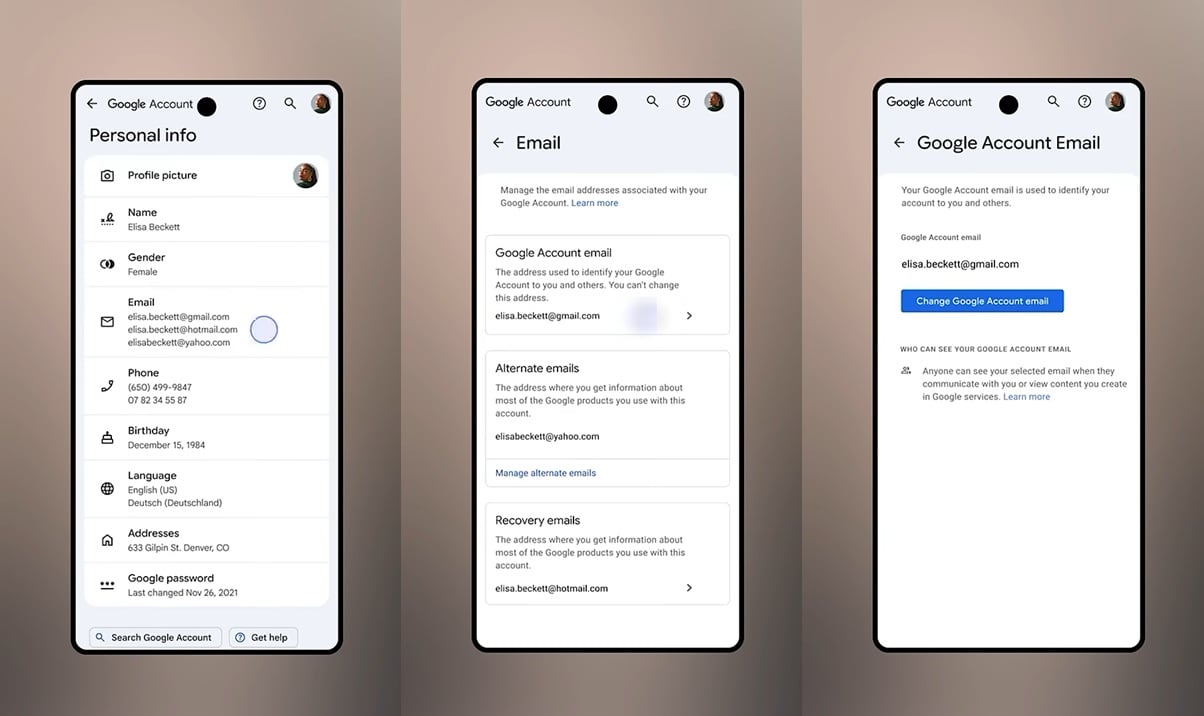
The rollout aims to provide users with greater flexibility in managing their email identity. To change their Gmail address, users should navigate to Google Account settings, select Personal info, then Email, and finally Google Account email. A blue button marked “Change Google Account email” will enable them to select a new email address.
The original Gmail address will remain as an alternate email, ensuring that emails sent to it will still be received. However, users are limited to changing their email address once every 12 months.
If the option to change the email is not available immediately, Google advises users to check back in a few days, as the rollout may take time to reach all accounts in the U.S.